This blog post demonstrates how to integrate the Agent API into a Salesforce Lightning Web Component (LWC), specifically using the Streaming API for real-time interactions with Agentforce agents.
1. Configure and Test Agent API Using Postman
Before jumping into LWC implementation, I recommend validating your API setup using Postman. You can refer to my earlier blog post for detailed steps on how to:
- Authenticate using the OAuth 2.0 Client Credentials flow
- Start a session
- Send a message
- End the session
2. Create an LWC to Invoke the Agent API
The Agent API can be invoked either synchronously or via streaming. In this blog, we will focus on the Streaming API, which enables real-time two-way communication between your component and the AI agent.
Steps Involved:
A. Prerequisites
- Create a Connected App
- Enable OAuth Settings
- Add required OAuth scopes (refresh_token, api, etc.)
- Create an Einstein Agent in Agentforce
- Add API Connection using the credentials from the Connected App
B. Implement LWC Component
Your LWC will handle the complete Agent interaction cycle:
- Get Access Token
- Authenticate using the Client Credentials flow
- Start Session
- Use the token to initiate a session with the Agent
- Send Message via Streaming API
- Establish a WebSocket connection and send the message in real time
- End Session
- Cleanly terminate the session once interaction is complete
<!-- chatBoatAgent.html --!>
<template>
<div class="chat-container">
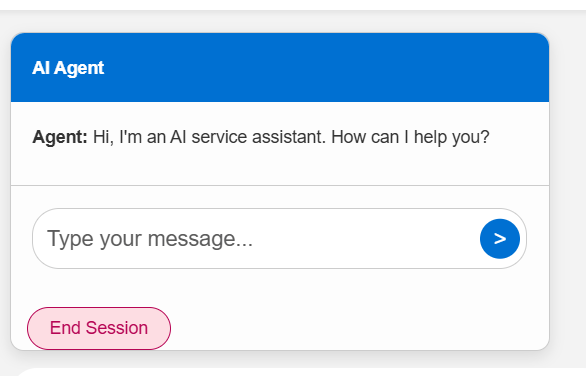
<div class="chat-header">AI Agent</div>
<template if:true={sessionStarted}>
<div class="chat-body">
<template for:each={messages} for:item="msg">
<div key={msg.id} class={msg.cssClass}>
<strong>{msg.sender}:</strong> {msg.text}
</div>
</template>
<!-- Show loading text -->
<template if:true={isWaiting}>
<div class="msg bot loading">
<strong>Agent:</strong> <i>fetching response...</i>
</div>
</template>
</div>
<div class="chat-footer">
<div class="input-wrapper">
<input
type="text"
class="chat-input"
placeholder="Type your message..."
value={userInput}
oninput={handleInput}
disabled={isWaiting}
onmouseenter={sendMessage}
/>
<button class="send-btn" onclick={sendMessage} disabled={isWaiting}>
>
</button>
</div>
</div>
<lightning-button variant="destructive" label="End Session" onclick={endSession}
class="slds-m-left_small slds-m-top_small"></lightning-button>
</template>
<template if:false={sessionStarted}>
<lightning-button variant="brand" label="Start Session" onclick={startSession} class="slds-m-top_medium">
</lightning-button>
</template>
</div>
</template><!-- chatBoatAgent.js --!>
import { LightningElement, track } from 'lwc';
import startSessionApex from '@salesforce/apex/EinsteinChatBotController.startSession';
import getAccessToken from '@salesforce/apex/EinsteinChatBotController.getAccessToken';
export default class ChatBotScreen extends LightningElement {
@track messages = [];
@track userInput = '';
sessionId;
accessToken;
sessionStarted = false;
@track isWaiting = false;
async startSession() {
try {
// Step 1: Get Access Token
const token = await getAccessToken();
this.accessToken = token;
// Step 2: Start Session
const sessionRes = await startSessionApex({ accessToken: this.accessToken });
this.sessionId = sessionRes.sessionId;
this.sessionStarted = true;
// Step 3: Push initial bot message
const welcome = sessionRes.messages[0];
this.messages = [{
id: welcome.id,
sender: 'Agent',
text: welcome.message,
cssClass: 'msg bot'
}];
} catch (err) {
console.error('Start session failed:', err);
}
}
async sendMessage() {
if (!this.userInput || !this.sessionStarted) return;
const timestamp = Date.now();
// Push user message
const userMsg = {
id: Date.now(),
sender: 'You',
text: this.userInput,
cssClass: 'msg user'
};
this.messages.push(userMsg);
this.isWaiting = true;
const body = {
message: {
sequenceId: Date.now(),
type: 'Text',
text: this.userInput
},
variables: []
};
const streamUrl = `https://api.salesforce.com/einstein/ai-agent/v1/sessions/${this.sessionId}/messages/stream`;
try {
const response = await fetch(
`https://api.salesforce.com/einstein/ai-agent/v1/sessions/${this.sessionId}/messages/stream`,
{
method: 'POST',
headers: {
'Authorization': `Bearer ${this.accessToken}`,
'Content-Type': 'application/json'
},
body: JSON.stringify(body)
}
);
if (!response.ok || !response.body) {
throw new Error('Streaming response failed or no response body.');
}
const reader = response.body.getReader();
const decoder = new TextDecoder('utf-8');
let buffer = '';
let messageChunks = '';
while (true) {
const { done, value } = await reader.read();
if (done) break;
buffer += decoder.decode(value, { stream: true });
const events = buffer.split('\n\n');
for (let i = 0; i < events.length - 1; i++) {
const eventBlock = events[i].trim();
const dataLine = eventBlock.split('\n').find(line => line.startsWith('data:'));
if (dataLine) {
const jsonText = dataLine.replace(/^data:\s*/, '');
try {
const parsed = JSON.parse(jsonText);
const msgType = parsed.message?.type;
if (msgType === 'TextChunk') {
messageChunks += parsed.message?.message || '';
}
if ((msgType === 'Inform' || msgType === 'EndOfTurn') && messageChunks.trim()) {
const finalMessage = parsed.message?.message || messageChunks;
// ✅ Only push if message is non-empty and not already displayed
if (finalMessage.trim()) {
this.messages.push({
id: parsed.message?.id || Date.now(),
sender: 'Agent',
text: finalMessage.trim(), // trim to remove trailing spaces
cssClass: 'msg bot'
});
}
messageChunks = ''; // Reset after message is used
this.isWaiting = false;
}
} catch (e) {
console.warn('Failed to parse streaming line:', jsonText, e);
}
}
}
// Preserve leftover buffer if partial event remains
buffer = events[events.length - 1];
}
} catch (err) {
console.error('Error sending message:', err);
}
this.userInput = '';
}
async endSession() {
if (!this.sessionId || !this.accessToken) return;
try {
await fetch(`https://api.salesforce.com/einstein/ai-agent/v1/sessions/${this.sessionId}`, {
method: 'DELETE',
headers: {
'Authorization': `Bearer ${this.accessToken}`
}
});
this.messages.push({
id: Date.now(),
sender: 'Agent',
text: 'Session ended.',
cssClass: 'msg bot'
});
this.sessionStarted = false;
this.sessionId = null;
} catch (err) {
console.error('End session failed:', err);
}
}
handleInput(event) {
this.userInput = event.target.value;
}
handleKeyUp(event) {
if (event.key === 'Enter') {
this.sendMessage();
}
}
}<!-- chatBoatAgent.css --!>
.chat-container {
border: 1px solid #ccc;
border-radius: 10px;
width: 400px;
display: flex;
flex-direction: column;
font-family: Arial, sans-serif;
background: #fdfdfd;
box-shadow: 0 4px 10px rgba(0,0,0,0.1);
}
.chat-header {
background: #0070d2;
color: white;
padding: 1rem;
font-weight: bold;
border-top-left-radius: 10px;
border-top-right-radius: 10px;
}
.chat-body {
flex-grow: 1;
padding: 1rem;
overflow-y: auto;
max-height: 300px;
}
.chat-footer {
padding: 1rem;
border-top: 1px solid #ccc;
}
.input-wrapper {
position: relative;
display: flex;
}
.chat-input {
flex-grow: 1;
padding: 10px 35px 10px 10px;
border-radius: 20px;
border: 1px solid #ccc;
outline: none;
font-size: 1rem;
}
.send-btn {
position: absolute;
right: 5px;
top: 50%;
transform: translateY(-50%);
background: #0070d2;
color: white;
border: none;
border-radius: 50%;
width: 30px;
height: 30px;
font-size: 1rem;
cursor: pointer;
}
.send-btn:disabled {
background: #ccc;
cursor: not-allowed;
}
.msg {
margin-bottom: 10px;
}
.msg.user {
text-align: right;
color: #0070d2;
}
.msg.bot {
text-align: left;
color: #333;
}
.msg.loading {
font-style: italic;
color: gray;
}<!-- XML Config file -->
<?xml version="1.0"?>
<LightningComponentBundle xmlns="http://soap.sforce.com/2006/04/metadata">
<apiVersion>62.0</apiVersion>
<isExposed>true</isExposed>
<targets>
<target>lightning__HomePage</target>
</targets>
</LightningComponentBundle>/**
* @File Name : EinsteinChatBotController.cls
* @Description :
* @Author : Naveen Reddy
* @Last Modified By :
* @Last Modified On : April 18, 2025
* @Modification Log :
*==============================================================================
* Ver | Date | Author | Modification
*==============================================================================
* 1.0 | April 18, 2025 | | Initial Version
**/
public with sharing class EinsteinChatBotController {
private static final String CLIENT_ID = '3MVG9iHJIKsgQcWIe3_l4hsfVbd219.dRAtPS3vSXEh_DOuNvRgMRvNy4PMocdOmvhC2CKX9w3Ckwc9aROJyB';
private static final String CLIENT_SECRET = '5442305052B378C40F3FB960632E14F57A5F1F9DFFC63CAC2CED054874EB408B';
private static final String ORG_DOMAIN = 'https://ta1735994469967.my.salesforce.com';
private static final String API_HOST = 'https://api.salesforce.com';
private static final String AGENT_ID = '0XxKc000000TTc1KAG';
@AuraEnabled(cacheable=false)
public static String getAccessToken() {
HttpRequest req = new HttpRequest();
req.setEndpoint(ORG_DOMAIN + '/services/oauth2/token');
req.setMethod('POST');
req.setHeader('Content-Type', 'application/x-www-form-urlencoded');
req.setBody('grant_type=client_credentials' +
'&client_id=' + EncodingUtil.urlEncode(CLIENT_ID, 'UTF-8') +
'&client_secret=' + EncodingUtil.urlEncode(CLIENT_SECRET, 'UTF-8'));
Http http = new Http();
HttpResponse res = http.send(req);
if (res.getStatusCode() == 200) {
Map<String, Object> json = (Map<String, Object>) JSON.deserializeUntyped(res.getBody());
return (String) json.get('access_token');
} else {
throw new AuraHandledException('Access token error: ' + res.getBody());
}
}
@AuraEnabled
public static Map<String, Object> startSession(String accessToken) {
HttpRequest req = new HttpRequest();
req.setEndpoint(API_HOST + '/einstein/ai-agent/v1/agents/' + AGENT_ID + '/sessions');
req.setMethod('POST');
req.setHeader('Authorization', 'Bearer ' + accessToken);
req.setHeader('Content-Type', 'application/json');
String body = JSON.serialize(new Map<String, Object>{
'externalSessionKey' => String.valueOf(Crypto.getRandomLong()),
'instanceConfig' => new Map<String, String>{ 'endpoint' => ORG_DOMAIN },
'tz' => 'America/Los_Angeles',
'variables' => new List<Object>{
new Map<String, Object>{
'name' => '$Context.EndUserLanguage',
'type' => 'Text',
'value' => 'en_US'
}
},
'featureSupport' => 'Streaming',
'streamingCapabilities' => new Map<String, Object>{ 'chunkTypes' => new List<String>{ 'Text' } },
'bypassUser' => true
});
req.setBody(body);
HttpResponse res = new Http().send(req);
if (res.getStatusCode() == 200) {
return (Map<String, Object>) JSON.deserializeUntyped(res.getBody());
} else {
throw new AuraHandledException('Start session error: ' + res.getBody());
}
}
}3. Add Your LWC Component to the Home Page
Deploy the LWC and add it to a desired location on the Lightning Home Page
4. Test the Integration
Test the flow end-to-end:
- Ensure authentication succeeds
- Session starts correctly
- Messages are exchanged in real time
- Session ends gracefully

 SAGE CLOUD
Leave a comment